Atomy Europe Guide
Atomy personal account: update and complete your personal information (step by step)
First, please check and complete your personal information. This is essential to secure your account, receive your orders correctly, and later duplicate the method with your future team.
Why this step matters
Duplication: do it yourself first, then teach your team
At Atomy, success does not come from “quick commissions”, but from a duplicable structure. If you cannot properly configure your own account, how can you expect your team to do it?
Tip: keep this guide and send it to every new member. Repetition creates duplication.
Steps
1) Access the “My Atomy” menu
- Log in to your Atomy Europe account.
- At the top of the page, click on your Name / ID or the 👤 icon.
- If you clicked the icon, click again on “My Atomy” to open the full menu.
Personal Account
2) Open “Personal Account”
In the My Atomy menu, click on Personal Account. Atomy will then ask you to confirm your password.
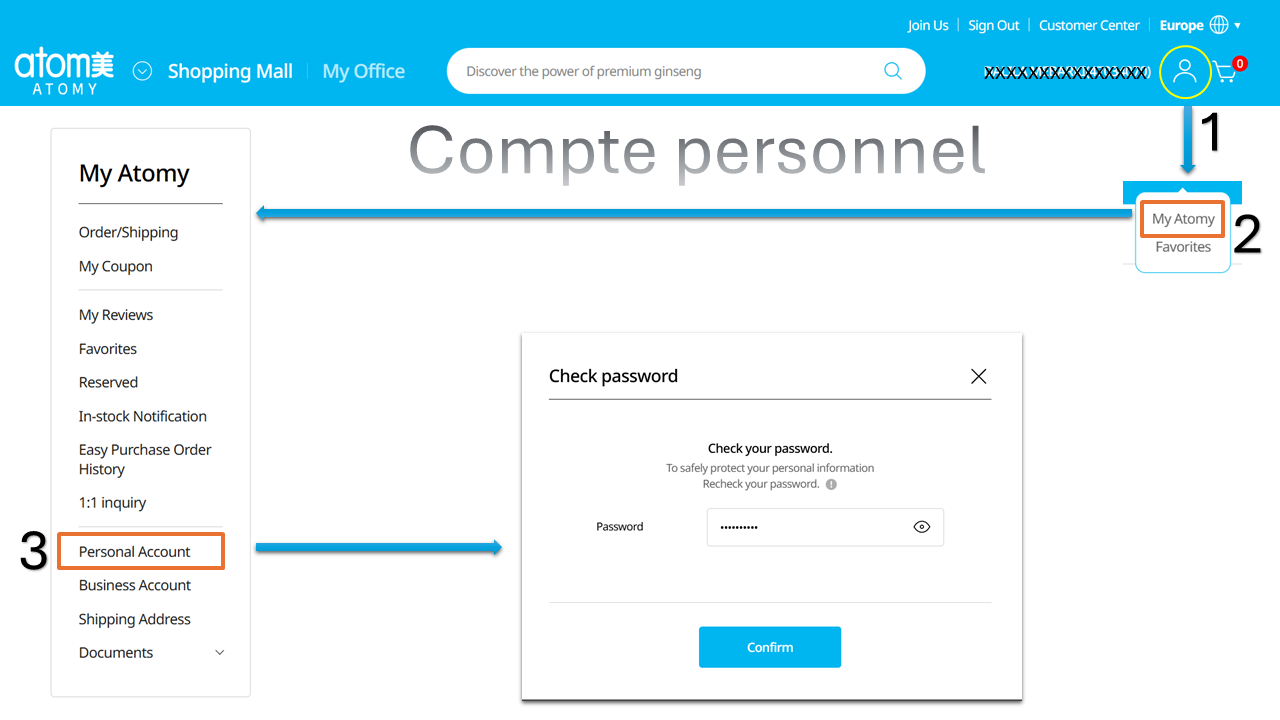
- Enter your password on the “Check password” screen.
- Click Confirm to access the edit page.
3) Update your email (if needed) and confirm the code
On the Edit Personal Information page, check your email address. If you used a temporary email during registration, replace it with your personal email.
Important
If you change your email, Atomy will send a verification code to the new email address. You must confirm this code to validate the change.
Phone
4) Check your phone number (country + prefix)
Verify your mobile number and the country code (for example DE +49, FR +33).
Address
5) Complete and confirm your postal address
In Address of Residence, complete your delivery address. An incomplete address may delay deliveries.
- Click Search.
- Enter Street address and Detailed address if needed.
- Add Postal code and City.
- Check and confirm.
Confirmation
6) Done ✅
- ✅ Your account is up to date
- ✅ Your email is validated
- ✅ Your address is ready for delivery
- ✅ You can now duplicate this method with your team